

Observo-Preflight-Check
Run the Preflight Check
2
Copy and paste the script logic
#!/bin/bash

# ==============================================================================
# Observo Pre-Flight Installer Check v8.1
# Features: Dual-Stage Connectivity (SSL/Net), Smart Disk, Proxy Wizard, Arch Checks
# ==============================================================================

# --- Auto-Elevate to Root ---
if [ "$EUID" -ne 0 ]; then
  echo "Elevating permissions to root..."
  exec sudo "$0" "$@"
fi

# --- Colors ---
RED='\033[0;31m'
GREEN='\033[0;32m'
YELLOW='\033[1;33m'
BLUE='\033[0;34m'
CYAN='\033[0;36m'
NC='\033[0m'

LOG_FILE="observo_preflight_report.txt"
> "$LOG_FILE"
OBSERVO_INSTALLED=false

log() {
    echo -e "$1"
    echo -e "$1" | sed 's/\x1b\[[0-9;]*m//g' >> "$LOG_FILE"
}

header() {
    log "\n${BLUE}============================================================${NC}"
    log "${BLUE} $1 ${NC}"
    log "${BLUE}============================================================${NC}"
}

# ==============================================================================
# 1. EXISTING INSTALLATION CHECK
# ==============================================================================
check_existing_install() {
    header "1. EXISTING INSTALLATION CHECK"

    if systemctl is-active --quiet k3s; then
        K3S_STATUS="${GREEN}Active${NC}"
        export KUBECONFIG=/etc/rancher/k3s/k3s.yaml
        if kubectl get ns observo &> /dev/null || kubectl get ns observo-client &> /dev/null; then
             OBSERVO_INSTALLED=true
             log "${GREEN}[DETECTED] An existing Observo installation was found.${NC}"
             log "  - K3s Service:     $K3S_STATUS"
             log "  - Observo Namespace: ${GREEN}Found${NC}"
             log "  - NOTE: Disk space checks will be relaxed (usage is expected)."
        else
             log "${YELLOW}[INFO] K3s is running, but Observo namespaces were not found.${NC}"
        fi
    else
        log "${BLUE}[INFO] No active K3s/Observo installation detected.${NC}"
    fi
}

# ==============================================================================
# 2. PROXY CONFIGURATION WIZARD
# ==============================================================================
configure_proxy_settings() {
    header "2. PROXY CONFIGURATION WIZARD"

    if [[ -z "$http_proxy" ]] && [[ -z "$https_proxy" ]]; then
        log "${GREEN}[INFO] No active proxy variables detected.${NC}"
        log "Verifying direct internet access..."
        if curl -s --connect-timeout 5 http://www.google.com > /dev/null; then
             log "${GREEN}[OK] Direct internet access confirmed.${NC}"
        else
             log "${YELLOW}[WARN] No proxy set, but cannot reach internet. Check your gateway.${NC}"
        fi
        return
    fi

    log "${YELLOW}[WARN] Proxy variables detected!${NC}"
    log "Current no_proxy: ${no_proxy:-'none'}"

    local INTERNAL_RANGES="localhost,127.0.0.1,10.0.0.0/8,192.168.0.0/16,172.16.0.0/12,.svc,.cluster.local"
    # UPDATED: Added cloudfront.net and ubuntu.com based on new requirements
    local EXTERNAL_WHITELIST=".ubuntu.com,.observo.ai,.k3s.io,.github.com,.githubusercontent.com,.helm.sh,.docker.io,.cloudflare.docker.com,.quay.io,.cloudfront.net,.ecr.aws,.k8s.io,.dkr.ecr.us-east-1.amazonaws.com,.s3.dualstack.eu-south-1.amazonaws.com,.pkg.dev,.s3.us-east-1.amazonaws.com"
    local NEW_NO_PROXY="${no_proxy}"
    local CHANGES_MADE=false

    echo ""
    echo -e "${CYAN}[Step 1/2] Internal K3s Communication${NC}"
    echo "K3s requires internal traffic to BYPASS the proxy."
    read -p ">> Add internal K3s ranges to no_proxy? (Recommended) [y/n]: " -n 1 -r REPLY_INTERNAL

    if [[ $REPLY_INTERNAL =~ ^[Yy]$ ]]; then
        if [[ -z "$NEW_NO_PROXY" ]]; then NEW_NO_PROXY="${INTERNAL_RANGES}"; else NEW_NO_PROXY="${NEW_NO_PROXY},${INTERNAL_RANGES}"; fi
        CHANGES_MADE=true
    fi

    echo ""
    echo -e "${CYAN}[Step 2/2] External Domain Whitelist${NC}"
    echo "Domains: .observo.ai, .github.com, .docker.io, .amazonaws.com, etc."
    echo "If your proxy handles these, say NO. If you want to bypass proxy for them, say YES."
    read -p ">> Add these external domains to no_proxy? [y/n]: " -n 1 -r REPLY_EXTERNAL

    if [[ $REPLY_EXTERNAL =~ ^[Yy]$ ]]; then
        if [[ -z "$NEW_NO_PROXY" ]]; then NEW_NO_PROXY="${EXTERNAL_WHITELIST}"; else NEW_NO_PROXY="${NEW_NO_PROXY},${EXTERNAL_WHITELIST}"; fi
        CHANGES_MADE=true
    fi

    if [ "$CHANGES_MADE" = true ]; then
        NEW_NO_PROXY=$(echo "$NEW_NO_PROXY" | sed 's/,,/,/g' | sed 's/^,//' | sed 's/,$//')

        cp /etc/environment /etc/environment.bak
        if grep -q "no_proxy" /etc/environment; then
            sed -i "s|^no_proxy=.*|no_proxy=\"$NEW_NO_PROXY\"|" /etc/environment
            sed -i "s|^NO_PROXY=.*|NO_PROXY=\"$NEW_NO_PROXY\"|" /etc/environment
        else
            echo "no_proxy=\"$NEW_NO_PROXY\"" >> /etc/environment
            echo "NO_PROXY=\"$NEW_NO_PROXY\"" >> /etc/environment
        fi

        export no_proxy="$NEW_NO_PROXY"
        export NO_PROXY="$NEW_NO_PROXY"
        log "${GREEN}[SUCCESS] Proxy settings updated!${NC}"
    else
        echo ""
        log "No changes made to proxy settings."
    fi
}

# ==============================================================================
# 3. AUDIT & DISK
# ==============================================================================
run_system_checks() {
    header "3. SYSTEM AUDIT"

    log ">> Privileged Users (UID >= 1000):"
    printf "${CYAN}%-15s %-10s %-15s %-30s${NC}\n" "USERNAME" "UID" "PRIVILEGE" "GROUPS"
    while IFS=: read -r username _ uid _ _ _ _; do
        if [[ $uid -ge 1000 ]] || [[ $uid -eq 0 ]]; then
            if [[ "$username" != "nobody" ]]; then
                local groups=$(id -Gn "$username" | tr ' ' ',')
                local priv="Standard"
                if [[ "$groups" == *"sudo"* ]] || [[ "$groups" == *"wheel"* ]] || [[ "$uid" -eq 0 ]]; then
                    priv="${GREEN}ADMIN/ROOT${NC}"
                fi
                printf "%-15s %-10s %-24b %-30s\n" "$username" "$uid" "$priv" "$groups"
                echo "$username | UID: $uid | Priv: $(echo "$priv" | sed 's/\x1b\[[0-9;]*m//g')" >> "$LOG_FILE"
            fi
        fi
    done < /etc/passwd

    echo ""
    log ">> Disk Space Check (Cleaning overlay/tmpfs noise):"
    printf "${CYAN}%-20s %-10s %-10s %-10s %-10s %-20s${NC}\n" "FILESYSTEM" "TYPE" "SIZE" "USED" "AVAIL" "MOUNTED"

    df -hT | grep -vE "^tmpfs|^devtmpfs|^loop|^overlay|/run" | tail -n +2 | while read -r fs type size used avail pcent mount; do
        COLOR=$NC
        AVAIL_NUM=$(echo "$avail" | sed 's/[^0-9.]//g')
        UNIT=$(echo "$avail" | sed 's/[0-9.]//g')

        if [[ "$UNIT" == "G" ]]; then
            if (( $(echo "$AVAIL_NUM > 50" | bc -l) )); then COLOR=$GREEN; elif (( $(echo "$AVAIL_NUM < 10" | bc -l) )); then COLOR=$RED; fi
        elif [[ "$UNIT" == "M" || "$UNIT" == "K" ]]; then COLOR=$RED; fi

        printf "%-20s %-10s %-10s %-10s ${COLOR}%-10s${NC} %-20s\n" "$fs" "$type" "$size" "$used" "$avail" "$mount"
        echo "$fs $type $size $used $avail $mount" >> "$LOG_FILE"
    done

    ROOT_AVAIL=$(df -BG / | awk 'NR==2 {print $4}' | sed 's/G//')

    echo ""
    if [ "$ROOT_AVAIL" -lt 50 ]; then
        if [ "$OBSERVO_INSTALLED" = true ]; then
            log "${YELLOW}[WARN] Main Disk (/) has ${ROOT_AVAIL}GB free.${NC}"
            log "       (Since Observo is already installed, this usage is likely expected/normal)."
        else
            log "${RED}[FAIL] Main Disk (/) has ${ROOT_AVAIL}GB free. 50GB required for NEW installation.${NC}"
        fi
    else
        log "${GREEN}[PASS] Main Disk (/) has ${ROOT_AVAIL}GB free.${NC}"
    fi
}

# ==============================================================================
# 4. TOOLS & CONNECTIVITY
# ==============================================================================
run_connectivity_checks() {
    header "4. TOOLS & CONNECTIVITY"

    TOOLS=("curl" "grep" "awk" "df" "vi" "openssl" "sed" "bc")
    MISSING=0
    for tool in "${TOOLS[@]}"; do
        if command -v "$tool" &> /dev/null; then echo -n ""; else
            log "${RED}[MISSING] Tool: $tool${NC}"
            ((MISSING++))
        fi
    done
    if [ "$MISSING" -eq 0 ]; then log "${GREEN}[PASS] All system tools found.${NC}"; fi

    echo ""
    log "Checking connectivity (Timeout 15s)..."
    log "NOTE: ${GREEN}[CONNECTED]${NC} = Full Access (Network + SSL Trusted)."
    log "      ${YELLOW}[SSL ERROR]${NC} = Network Open, but SSL Untrusted (Proxy Inspection)."
    log "                    Action: Add Corporate CA certs to /etc/ssl/certs."
    log "      ${RED}[BLOCKED]${NC}   = Network Unreachable (Timeout or Refused)."

    check_conn() {
        local target=$1; local port=$2; local label=$3
        if [[ "$target" == *"*"* ]]; then return; fi

        # 1. Try Strict SSL (The Requirement for Installer)
        local code_strict=$(curl -s -o /dev/null -w "%{http_code}" --connect-timeout 15 "https://${target}:${port}" 2>/dev/null)

        if [[ "$code_strict" -gt 0 ]]; then
            log "${GREEN}[CONNECTED] $label ($target)${NC}"
            return
        fi

        # 2. Try Insecure SSL (To diagnose Firewall vs SSL issues)
        local code_insecure=$(curl -s -k -o /dev/null -w "%{http_code}" --connect-timeout 15 "https://${target}:${port}" 2>/dev/null)

        if [[ "$code_insecure" -gt 0 ]]; then
            log "${YELLOW}[SSL ERROR] $label ($target)${NC}"
        else
            log "${RED}[BLOCKED]   $label ($target)${NC}"
        fi
    }

    log "\n--- Infrastructure (Installers & Tools) ---"
    check_conn "get.k3s.io" "443" "K3s Install"
    check_conn "update.k3s.io" "443" "K3s Update"
    check_conn "get.helm.sh" "443" "Helm"
    check_conn "github.com" "443" "GitHub"
    check_conn "release-assets.githubusercontent.com" "443" "GitHub Assets"
    # UPDATED: Added OS Update Check
    check_conn "archive.ubuntu.com" "443" "Ubuntu Updates (*.ubuntu.com)"

    log "\n--- Container Registries & CDNs ---"
    check_conn "registry-1.docker.io" "443" "Docker Hub"
    check_conn "auth.docker.io" "443" "Docker Auth"
    check_conn "production.cloudflare.docker.com" "443" "Docker CDN"
    check_conn "quay.io" "443" "Quay Registry"
    check_conn "cdn01.quay.io" "443" "Quay CDN"
    check_conn "public.ecr.aws" "443" "AWS ECR"
    check_conn "registry.k8s.io" "443" "K8s Registry"
    check_conn "europe-west8-docker.pkg.dev" "443" "Google Artifacts"

    log "\n--- AWS S3 Buckets (Specific Requirements) ---"
    check_conn "prod-registry-k8s-io-eu-south-1.s3.dualstack.eu-south-1.amazonaws.com" "443" "AWS S3 (K8s EU)"
    check_conn "prod-us-east-1-starport-layer-bucket.s3.us-east-1.amazonaws.com" "443" "AWS S3 (Starport)"

    log "\n--- Observo Manager (Site to Manager) ---"
    # US
    check_conn "p01-metrics.observo.ai" "443" "US Metrics"
    check_conn "p01-api.observo.ai" "443" "US API"
    check_conn "p01-auth.observo.ai" "443" "US Auth"
    # EU
    check_conn "eu-1-metrics.observo.ai" "443" "EU Metrics"
    check_conn "eu1-api.observo.ai" "443" "EU API"
    check_conn "eu1-auth.observo.ai" "443" "EU Auth"
    # Mumbai
    check_conn "ap-1-metrics.observo.ai" "443" "Mumbai Metrics"
    check_conn "ap1-api.observo.ai" "443" "Mumbai API"
    check_conn "ap1-auth.observo.ai" "443" "Mumbai Auth"

    log "\n--- Sandbox / POC Environment (Target) ---"
    # UPDATED: Added sb-logs and reorganized based on new docs
    check_conn "sb-metrics.observo.ai" "443" "SB Metrics"
    check_conn "sb-logs.observo.ai" "443" "SB Logs"
    check_conn "sb-api.observo.ai" "443" "SB API"
    check_conn "sb-auth.observo.ai" "443" "SB Auth"

    log "\n--- Incoming Traffic / Firewall Warnings ---"
    log "${YELLOW}[ACTION REQUIRED]${NC} Ensure your firewall allows INCOMING traffic from:"
    log "  - IP: ${CYAN}3.22.184.24${NC} (Observo NAT Gateway)"
    log "  - Desc: Required for Manager to Site communication (updates/config)."
    log "  - Docs: https://docs.observo.ai/6S3TPBguCvVUaX3Cy74P/deployment/sizing-and-compute-cost-planning/ports-protocols"
}

# --- Main Execution Flow ---
check_existing_install
configure_proxy_settings
run_system_checks
run_connectivity_checks

echo ""
log "Report saved to $LOG_FILE"Details Below
Reference Architecture
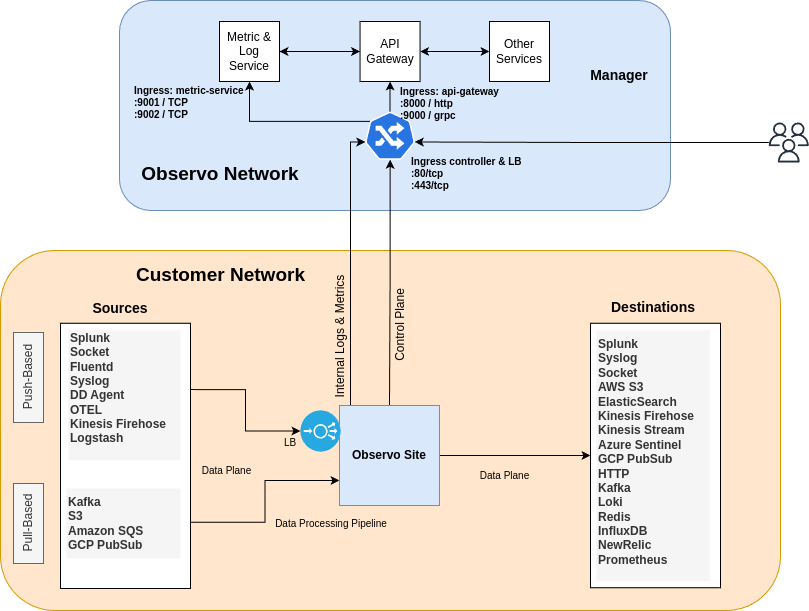
Your VM must freely communicate to both the Manager and the Install files. Allowing communication to the resources below is required.
Manager to Site Communication
Endpoint
Port
Description
IP Address
Description
Site to Installer Communication
Last updated
Was this helpful?